

Shared Server
Everything in the previous sections runs on your laptop. That's the fastest way to get started, but when you want your Omnigent accessible from your phone, shareable with teammates, or running while your laptop sleeps, you need to deploy.
This section covers Omnigent's architecture, the options for hosting the server, and the options for hosting the runner.
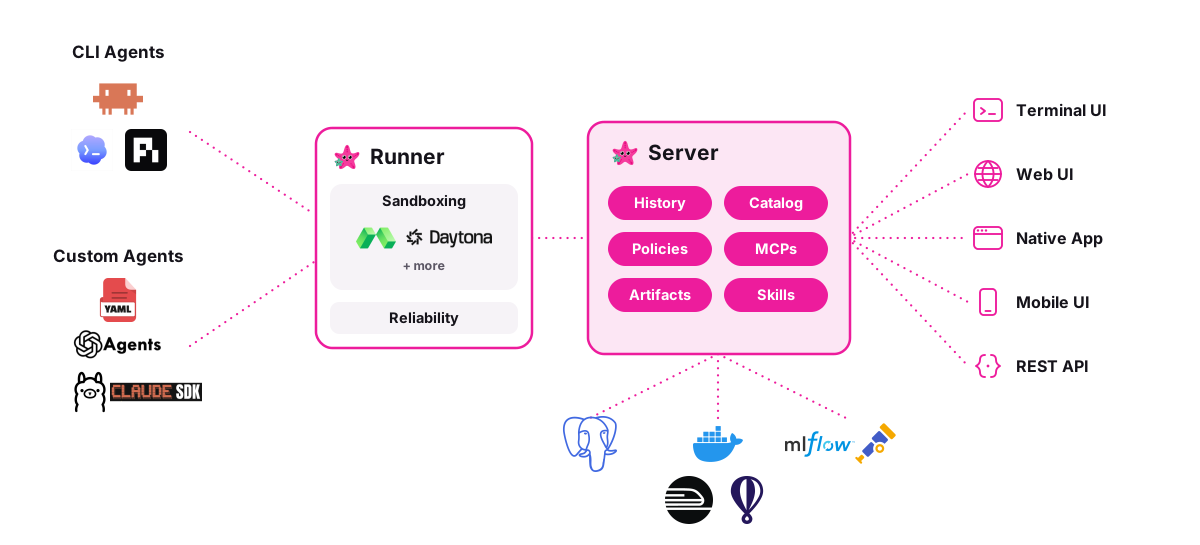
Omnigent has three components: the server, the runner, and the UI.
Server
The server is the central coordinator. It manages:
- Session history. Every conversation, message, and tool call is persisted in a database (Postgres or SQLite).
- Artifacts. Files, Omnigent bundles, and uploads.
- Catalog. Registered and built-in Omnigent specs.
- MCP proxy & policies. Proxies MCP tool calls with server-side policy enforcement.
- Skills. Skill definitions that Omnigent can load.
- Auth & accounts. User authentication (built-in accounts or OIDC/SSO).
There are a few options for hosting the server on the cloud:
Docker Compose
Deploy the Omnigent server with Docker Compose. The stack includes the server and a Postgres database.
cd deploy/docker
./bootstrap.sh          # generates DB password + cookie secret into .env
docker compose up -d    # Omnigent server + Postgres
Key variables in .env (See Auth & SSO for details on multi-user auth):
| Variable | Purpose |
|---|---|
DATABASE_URL | Postgres connection string |
OMNIGENT_AUTH_ENABLED | Enable multi-user auth (default: 1 in Docker) |
OMNIGENT_OIDC_COOKIE_SECRET | Session cookie secret |
OMNIGENT_OIDC_ISSUER | OIDC issuer URL (enables SSO) |
OMNIGENT_OIDC_CLIENT_ID | OIDC client ID |
OMNIGENT_OIDC_CLIENT_SECRET | OIDC client secret (omit for public PKCE clients that opt in) |
No admin password is auto-generated. On first boot the server reports
needs_setup: open the web UI and create the admin account there, or set
OMNIGENT_ACCOUNTS_INIT_ADMIN_PASSWORD in .env to preset it for headless deploys.
Extra built-in agents
Set OMNIGENT_BUILTIN_AGENT_DIRS to load extra built-in agents at server startup.
In Docker, use colon-separated paths to YAML specs or bundle directories inside
the container.
Place your agents under deploy/docker/agents/ and create
deploy/docker/docker-compose.override.yaml, which Compose loads alongside
docker-compose.yaml:
services:
  omnigent:
    environment:
      OMNIGENT_BUILTIN_AGENT_DIRS: /agents/my-agent.yaml:/agents/my-bundle
    volumes:
      - ./agents:/agents:ro
Replace the example paths with your agents, then apply the configuration from
deploy/docker:
docker compose up -d --force-recreate omnigentAfter editing a mounted spec, run docker compose restart omnigent to reload it.
Changes to the paths or mounts require the force-recreate command above.
Each agent is available to all users and named after its YAML file stem or bundle directory. Use a distinct name unless you intend to replace an existing built-in. Invalid or missing entries are logged and skipped.
Cloud platforms
Deploy the server to a cloud platform with managed infrastructure.
| Platform | Database | Deploy method |
|---|---|---|
| Railway | Managed Postgres | Import repo from GitHub |
| Render | Managed Postgres | One-click deploy |
| Fly.io | SQLite on volume | fly deploy from CLI |
| Hugging Face Spaces | SQLite (ephemeral) | Docker Space |
Railway & Render. On Railway, import the repo and add a Postgres plugin.
Adding the plugin does not wire its DATABASE_URL into the app on its own:
open the omnigent service's Variables, add a DATABASE_URL variable, and
set it to a reference to the Postgres service (${{Postgres.DATABASE_URL}}).
Until that reference is set, the deploy errors with DATABASE_URL is required on
every boot; add it, then redeploy. Render provisions the app and managed Postgres
over HTTPS via one-click deploy.
Both default to built-in accounts auth, so multi-user works out of the box.
Fly.io. Deploy with fly deploy using SQLite on a persistent
volume. Configuration files are in deploy/fly/ in the repo.
cd deploy/fly
fly deploy
The server idles around ~275 MB RSS. Fly's default 256 MB machine will OOM-loop. The
fly.toml in the repo pins a 1 GB machine. If you changed it, run fly scale memory 1024.
Hugging Face Spaces. Demo-grade Docker Space with SQLite. See
deploy/hf-spaces/ in the repo.
Warning: On Hugging Face Spaces, disk is ephemeral by default and persistent storage is a paid add-on. Data resets on every restart. Use this for demos only.
Databricks
On a Databricks workspace there are two paths, and most users want the managed one.
Managed (recommended). Omnigent on Databricks (Beta) is a fully managed service: Databricks operates the Omnigent server for you, already wired to workspace identity, Foundation Models, AI Gateway, and MLflow Tracing. There is no deploy tooling, Lakebase bootstrap, or bundle to maintain. Enable the Omnigent preview in your workspace settings and follow the quickstart there.
Self-managed. Deploy and operate the Omnigent server yourself on
Databricks Apps via Databricks Asset Bundles,
backed by Lakebase (Postgres) and Unity Catalog Volumes. Configuration is in
deploy/databricks/ in the repo. Reach for this only when the managed
service is not available in your region, or when you need something it does
not expose yet — custom YAML policies, bring-your-own provider API keys, or
custom egress controls.
The first-party Canvas extension is disabled by default. To enable it for
a specific self-managed app, set the OMNIGENT_ENABLE_CANVAS=true deployment
environment variable when invoking deploy/databricks/deploy.py:
OMNIGENT_ENABLE_CANVAS=true uv run python deploy/databricks/deploy.py \
    --app-name <canvas-enabled-app> ...
Leave the variable unset for every other app. --skip-web-ui deploys stay
API-only and ignore the Canvas opt-in. To ship additional extensions, pass
repeatable --extension-wheel arguments; every extension wheel must also fit
under the 10 MB Databricks Apps source-file cap.
Kubernetes
Deploy the Omnigent server to a Kubernetes cluster with the kustomize manifests
in deploy/kubernetes/ in the repo. The overlays/sandbox-runners/ overlay
additionally turns on the kubernetes managed sandbox provider
(sandbox.provider: kubernetes): a host_type: managed session spawns a
dedicated runner Pod that runs omnigent host and dials back to the server.
That provider imports a Kubernetes client the base server image omits, so the
overlay pulls the official ghcr.io/omnigent-ai/omnigent-server-kubernetes
image variant — the standard server image plus the kubernetes client extra
(OMNIGENT_EXTRAS=kubernetes). No self-built image is required; the overlay's
images: block already points at it.
kubectl apply -k deploy/kubernetes/overlays/sandbox-runners
# then create the omnigent-creds harness Secret (see the overlay README)
See the Kubernetes sandbox configuration reference
for Pod-start timeouts, persistent storage, rotation-friendly Secret mounts,
and — for the agent_sandbox provider — opt-in
native warm pools
that keep spare Pods ready before a session arrives.
Release features
Release features are gated behind the comma-separated OMNIGENT_FEATURES
variable (on a self-managed Databricks deploy, the --features deploy
argument). Each feature has a default, and the value overrides those defaults:
nameenables a feature.-namedisables it. An explicit disable wins regardless of order, so appending-nameworks as a kill switch even ifnameis also listed.- Unset or empty uses the defaults.
Unknown names, including unknown -name overrides, fail startup, so a typo
can't silently change what's rolled out.
OMNIGENT_FEATURES=usage_page,harness_install,-claude_osc_status
The server resolves the set once at startup and publishes its frontend-visible
features in GET /v1/info under features. Redeploy or restart every replica
after you change the value, then reload the web app. To roll a feature back,
add -feature_name and redeploy the same image.
Most release features (such as usage_page, harness_install, and
canvas) are off by default. Runner features
are resolved by each runner instead of the server:
| Feature | Default | Applies to | Effect |
|---|---|---|---|
claude_osc_status | On | Host / runner | claude-native sessions take their working, blocked, and idle status from Claude Code's OSC 7501 terminal reports, falling back to Claude's session status file and then pane activity. Not listed in /v1/info. |
The OSC path needs Claude Code 2.1.295 or later. Older CLIs use the fallback.
Setting CLAUDE_CODE_DISABLE_TERMINAL_TITLE also suppresses these status
reports.
Runner features are read from the host's environment, not the server's.
omni host forwards OMNIGENT_FEATURES to the runners it starts, including
when it runs as the CLI's background daemon, so changing a remote server's
environment does not change a separately running host. To turn a runner
feature off (for example OMNIGENT_FEATURES=-claude_osc_status), set it where
the host runs and restart the host and its runners. Then launch fresh
terminals, because existing terminals keep the configuration they launched
with.
Serving under a subpath
By default the server and web UI are served from the origin root (/). To
serve them under a path prefix instead — behind code-server's port proxy at
https://<host>/proxy/6767/, or an nginx/Traefik location /omnigent/ block —
set the base path. The environment variable and the CLI flag are equivalent:
OMNIGENT_WEB_BASE_PATH=/proxy/6767 omni server
# or
omni server --base-path /proxy/6767
The web UI then prefixes its API, SSE, WebSocket, and asset URLs with that path, and the server accepts requests whether or not the proxy forwards the prefix, so one value covers both kinds of proxy:
- Prefix-stripping proxies (code-server's
/proxy/<port>/) forward/v1/...— the server serves it as-is. - Non-rewriting proxies (code-server's
/absproxy/<port>/, or an nginxlocationblock without a rewrite) forward the full/proxy/6767/v1/...— the server strips the configured prefix before routing.
Server-issued redirects stay under the prefix too: login and logout, magic-link
sign-in, the device-code consent page used by omni login, and the GitHub /
Databricks connection callbacks all return to the prefixed app instead of the
origin root.
Value rules. Use a leading slash and no trailing slash (/proxy/6767); a
missing leading slash is added and a trailing slash is dropped. Unset, empty,
or / means a root deployment (unchanged behavior). The server refuses to
start with a value that:
- starts with
//, contains characters outside letters, digits, and-._~/(including percent-encoding), or has a./..segment; - begins with a reserved API segment —
api,assets,auth,docs,health,oauth,openapi.json,redoc,v1,.well-known; - begins with one of the web UI's own top-level routes —
approve,c,canvas,extensions,inbox,login,members,policies,register,settings,tasks,usage.
Auth behind a subpath. For built-in accounts, also set
OMNIGENT_ACCOUNTS_BASE_URL to the full public URL including the prefix (e.g.
https://<host>/proxy/6767) so login and invite redirects and cookies resolve
correctly. For OIDC, set
OMNIGENT_OIDC_REDIRECT_URI to the full public callback URL including the
prefix (e.g. https://<host>/proxy/6767/auth/callback).
Local managed server. omni server --background --base-path /proxy/6767
respawns the detached local server under that prefix. The prefix is remembered:
later commands that don't set a base path (a plain omni run, connect, …)
reuse the running server as-is rather than restarting it at the root, and only
an explicitly different value triggers a respawn. Browser links the CLI opens or
prints for that local server (the auto-opened web UI and /c/<id> session
links) include the prefix; links to a remote --server are never rewritten.
Runner
The runner is the per-session process that executes Omnigent loops. It manages the harness (Claude Code, Codex, Claude SDK, etc.), runs tools, and streams events back to the server over WebSocket. The server starts runners on a host: a machine you register with the server.
By default, the host is your laptop. Register it with:
omni login <server-url>  // if auth is enabled
omni host <server-url>
This is why your local Claude Code or Codex installation "just works." Runners started on your laptop have direct access to your machine's tools, files, and credentials.
However, moving the runner to a cloud sandbox host gives you:
- No laptop dependency. Your Omnigent runs even when your machine is off.
- Cloud-native tooling. Your Omnigent can access cloud resources directly.
- Isolation. Each Omnigent runs in its own container, separate from your local environment.
- Scalability. Run many Omnigents in parallel without taxing your machine.
We currently support the Databricks, Modal, Daytona, and Blaxel platforms, with more integrations on the way. Check out the Cloud Sandbox Host page for more detailed setup instructions.
UI
The web UI, terminal UI, and mobile UI all talk to the server. They never talk to the runner directly. This means:
- If the server is on your laptop, UI access is local only
- If the server is deployed to the cloud, any device can reach it, including your phone. Notably, cloud-hosted servers also allow you to collaborate with other users on the same server.
Collaboration
Once the server is cloud-hosted, Omnigent is multi-user: share a live session with a link, let a teammate co-drive your Omnigent, or fork a conversation so someone can continue independently. This has moved to its own page — see Pair Programming for co-drive, sharing with Read/Edit permissions, and forking.