

v0.13.0
Released 2026-09-09 · 3 min read · Omnigent maintainers
Omnigent 0.13.0 is a major release focused on tightening the loop between your agents, your code, and the infrastructure they run on — from watching a branch's pull request come together live inside the workspace to running every session in its own self-reclaiming sandbox. A new GitHub panel puts the PR, its checks, and a full diff right beside the agent, Canvas graduates into a built-in per-project board of live session cards, and a wave of managed-sandbox providers, faster session switching, and new harnesses round out the release.
1. GitHub PR panel in the session workspace
A new GitHub panel in the session workspace rail shows the branch's pull request without leaving Omnigent — the summary, comments, CI checks, and a stacked diff with a file-tree navigator, all refreshing live as the agent pushes. You watch the PR take shape in the same window where the work is happening.
To use it, start a New Chat from a repository with an open pull request, then open the panel and switch between the split Summary and Changes tabs to move from the overview to the file-by-file diff. In managed sandboxes with GitHub Connect configured, private clones and in-session git and gh authenticate as your connected account, so pushes and PR actions run as you.
2. Canvas as a built-in page
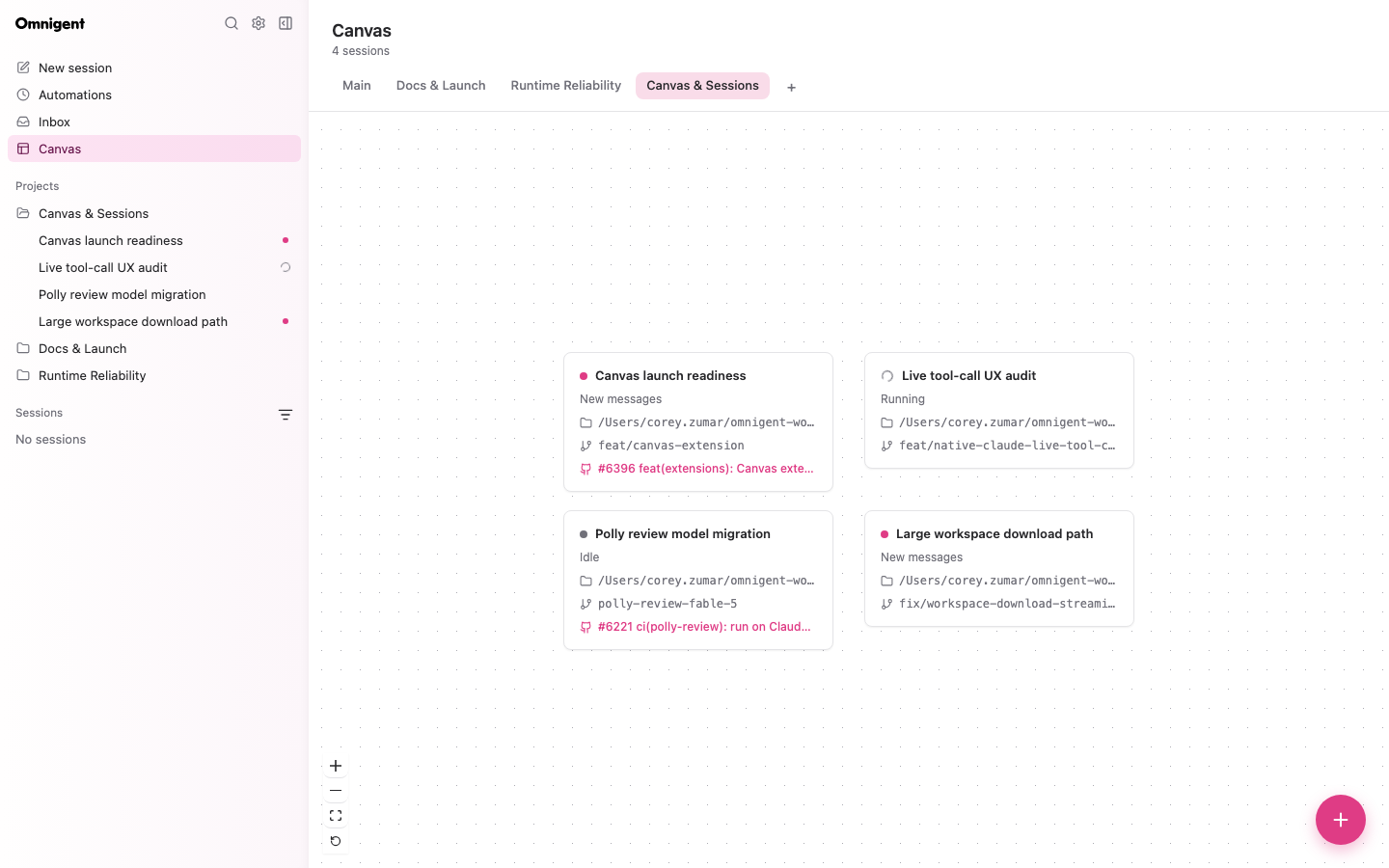
Canvas is now a built-in page rather than a separate extension: a per-project board of draggable session cards, each showing live status, its worktree branch, and a link to its PR. It gives you a spatial, at-a-glance view of everything in flight on a project.
From the board you can open a session's transcript or start a brand-new session in place, so Canvas becomes the launch point for your work rather than just a status display. Enable the built-in page with OMNIGENT_FEATURES=canvas.
3. New managed-sandbox providers
Omnigent gains two new ways to run managed sandboxes. You can run each host in a local libkrun microVM by setting sandbox.provider: microsandbox, which gives you sub-second boots and in-place resume, or run hosts as self-reclaiming Kubernetes agent-sandbox resources that stay alive while an agent is working, suspend when idle, and resume later with their workspace intact.
Both paths are built to avoid waste: sandboxes that remain offline can be reaped automatically, so idle compute doesn't linger.
Learn more in the Cloud Sandbox Host.
4. Instant session switching
Sessions now feel instant. New conversations open immediately while the server catches up in the background, and long transcripts virtualize so switching between them stays fast even when history is deep.
The sidebar keeps up too: rows label themselves with your first prompt and highlight the moment you click them, and new sessions can be auto-named for you — a behavior you can toggle in Settings.
Learn more in the Session management.
5. More harnesses and enterprise CLIs
Omnigent adds more ways to bring your preferred agents along. Jcode joins as a first-class ACP harness, and the EXTRA_HARNESS_CLIS build-arg bakes extra harness CLIs — goose, jcode, cursor, kimi, and more — into the host image, so you can extend the image without forking the Dockerfile.
Enterprises get two more building blocks: an opt-in OAuth 2.0 client-credentials grant, and a HashiCorp Vault Transit backend for the credential store.
Learn more in the Harnesses supported via ACP.
Before upgrading
- Managed terminals now require tmux 3.3 or newer. Upgrade tmux before launching a managed terminal.
- The standalone
omnigent-canvasextension has been removed. Enable the built-in Canvas page withOMNIGENT_FEATURES=canvasinstead. omnigent updateis deprecated. Useomnigent upgrade(oromni upgrade) instead.
Full Changelog: https://github.com/omnigent-ai/omnigent/blob/main/CHANGELOG.md
What's Next
Upgrade an existing Omnigent installation:
omni upgradeOr install Omnigent for the first time:
uv tool install --python 3.12 omnigent # or: pip install "omnigent"