

Moving agent orchestration from code to configuration
Agent orchestration systems like Gas Town, Agent Orchestrator, and Overstory promise coordinated teams that can tackle complex projects with less developer supervision. Many developers I talk to have written their own custom agent orchestration system. I'm no exception: I've written several personal orchestration frameworks that ran different agent harnesses in tmux windows or web terminals, handled messages between agents, and organized work with tickets or kanban boards.
I'm not using these custom systems anymore. Even with agents helping to write the code, handling session lifecycles, isolation, message delivery, and runtime adapters is a significant undertaking. Composing these systems inevitably turns into a complex plumbing project. I still think orchestrators and specialist agents can be useful, but building their infrastructure from scratch has just resulted in a list of abandoned projects. Omnigent solves this problem: you can design your multi-agent system and let Omnigent handle the plumbing.
Agent orchestration as declarative configuration
Designing a multi-agent system means deciding which roles exist, how they hand work to one another, what each role can do, and when a person should intervene. Implementing those decisions requires another layer of work: managing sessions, delivering messages and results, connecting tools, and enforcing permissions.
Omnigent lets you express the system in declarative YAML. Agents invoke subagents as tools, while Omnigent manages their sessions and communication. Policies and sandboxes define what each role can access. Omnigent supplies the runtime infrastructure that lets agents running in different harnesses work together as one system.
| You specify | Omnigent handles |
|---|---|
| Which roles exist and which harness each uses | Launching each role in the selected harness and managing its session |
| What agents hand off to one another | Dispatching work and delivering messages and results |
| What each role is allowed to do | Evaluating tool policies and enforcing sandbox boundaries |
| How the workflow proceeds and where people intervene | Maintaining inspectable session state and supporting interaction with each agent |
How to define your own multi-agent system in Omnigent
An Omnigent agent can be defined in a single YAML file or in a directory containing separate configurations for its subagents, skills, and tools. The configuration specifies each agent's instructions, harness, model, tool access, policies, and sandbox. The Custom Agents guide covers the complete configuration format. Here, we'll focus on the parts needed to compose a small research team.
People make all kinds of claims online, and the available evidence is often incomplete or taken out of context. An agent research workflow like the one we describe below could investigate whether a new developer tool actually improves performance, whether an industry practice delivers its claimed benefits, or whether a product's marketing holds up. To demonstrate the workflow, we'll give it a question about coffee co-fermentation, the practice of adding fruit or other ingredients during coffee fermentation.
The agent system has four roles:
- an orchestrator that delegates and sequences the work;
- a claim mapper that turns a broad question into discrete claims;
- a claim auditor that researches and evaluates each claim; and
- a brief writer that presents the results.
We'll walk through some of the key parts here. You can see the full configuration in the accompanying Gist.
Set up the agent directory
A custom agent configuration can live anywhere on disk. Keep it within a project when it evolves alongside that project, or in a stable personal directory when you want to reuse it.
We'll use the directory-based approach for this workflow. The root config.yaml defines the orchestrator, while the agents directory contains a configuration for each specialist:
agents/claim-audit/
├── config.yaml
└── agents/
    ├── claim_mapper/config.yaml
    ├── claim_auditor/config.yaml
    └── brief_writer/config.yaml
An agent directory can also include skills and tools directories when the team needs custom instructions or tools.
Configure the orchestrator
We'll start with the root orchestrator configuration (the top-level config.yaml in the directory tree above), which defines the primary agent, the tools it can use, and its sandbox environment. In this example, the orchestrator uses the Claude SDK with Claude Opus 5.
# config.yaml
spec_version: 1
name: claim_audit_coordinator
executor:
  type: omnigent
  model: claude-opus-5
  config: { harness: claude-sdk }

prompt: |
  You coordinate a four-role claim-audit team. You own phase order, the
  selected-claim list, and the decision record. You do not search the web,
  audit evidence, or write the final brief yourself.

  First dispatch the claim mapper. Select at most four auditable claims,
  then send each claim to one persistent auditor conversation. Do not
  dispatch the writer until every selected claim has been audited.
# Prompt truncated for the article. The full version defines repair limits,
# evidence rules, artifact handoffs, and stop conditions.

tools:
  agents: [claim_mapper, claim_auditor, brief_writer]

os_env:
  type: caller_process
  sandbox:
    type: darwin_seatbelt
    read_paths: ["."]
    write_paths: []
    allow_network: false

# Additional coordinator policies omitted; see the full configuration.
The orchestrator can read files from its working directory (read_paths: ["."]), but it cannot write files or access the network (write_paths: [], allow_network: false). Its subagents are listed under tools.agents, which gives the orchestrator access to the tools it needs to create sessions with them and send them work.
Define the claim auditor subagent
The claim auditor researches and evaluates one claim at a time. To let it research each claim, we give it Omnigent's built-in web_search tool and use Nimble as the search provider. This role uses Pi with GPT-5.6 Terra, demonstrating that a subagent can use a different harness and model from its orchestrator.
# agents/claim_auditor/config.yaml
spec_version: 1
name: claim_auditor
executor:
  type: omnigent
  model: gpt-5.6-terra
  config: { harness: pi }

prompt: |
  You are the claim auditor in a typed evidence pipeline. You receive one
  normalized claim plus its mapped observations. Audit that claim without
  replacing it with an easier or more interesting one.
# Prompt truncated for the article. The full version includes the evaluation
# rubric, evidence rules, source limits, and output format.

tools:
  builtins:
    - name: web_search
      search_provider: nimble
      api_key: ${NIMBLE_API_KEY}
      max_results: 3
      search_depth: deep

# Policy excerpt abridged. The full configuration includes additional
# lifecycle allowances and usage limits.
guardrails:
  policies:
    auditor_tool_allowlist:
      type: function
      on: [tool_call]
      function:
        path: omnigent.policies.builtins.cel.cel_policy
        arguments:
          expression: >-
            event.type != "tool_call"
            ? {"result": "ALLOW"}
            : event.data.name == "web_search"
            ? {"result": "ALLOW"}
            : {"result": "DENY"}
Nimble requires an API key and its searches may be billable, so the key must be available in the environment where the agent runs. The guardrail uses Omnigent's CEL policy to permit web_search and deny attempts to use any other tool, such as a Bash shell.
Define the claim mapper and brief writer subagents
The claim mapper also uses web search, but for a different purpose. It surveys up to eight sources, identifies no more than four auditable claims, and records who made each claim without evaluating it. Its guardrails limit it to web_search and prevent it from modifying files or publishing anything.
The brief writer has no web access. Its role is to turn the auditor's independent verification of each claim, along with the sources and context collected by the mapper, into a brief of fewer than 700 words and a matching scorecard. Its sandbox allows it to read the workflow artifacts and write only to the final output directory.
We won't cover these two configurations in detail here; both are available in the full configuration.
Run and register the agent
Once the custom agent system is configured, point omnigent run at the agent directory to start a session:
omnigent run agents/claim-audit/omnigent run uploads the bundle to the Omnigent server and starts a session. To make the team available as a reusable template independent of that session, register it when starting the server:
omnigent server stop
omnigent server --background --agent agents/claim-audit/
You can also ask an agent in Omnigent to create, register, and open a session with a custom team for you.
Example: A four-agent research workflow
The prompt
We start with a broad question prompted by a specific marketing claim. Here is a condensed version of the prompt:
Royal Coffee described a lemon-lime co-fermented Gesha as “electrified” and “obviously altered” by the addition of citrus juice. What is coffee co-fermentation? How do people say it affects flavor, and what evidence is there that it actually does? Look at scientific research, professional and industry observations, and community experience. Identify the main claims, especially where they conflict, and tell me how well each one stands up. Give me a concise one-page brief and a simple scorecard.
The orchestrator sends the question to the claim mapper.
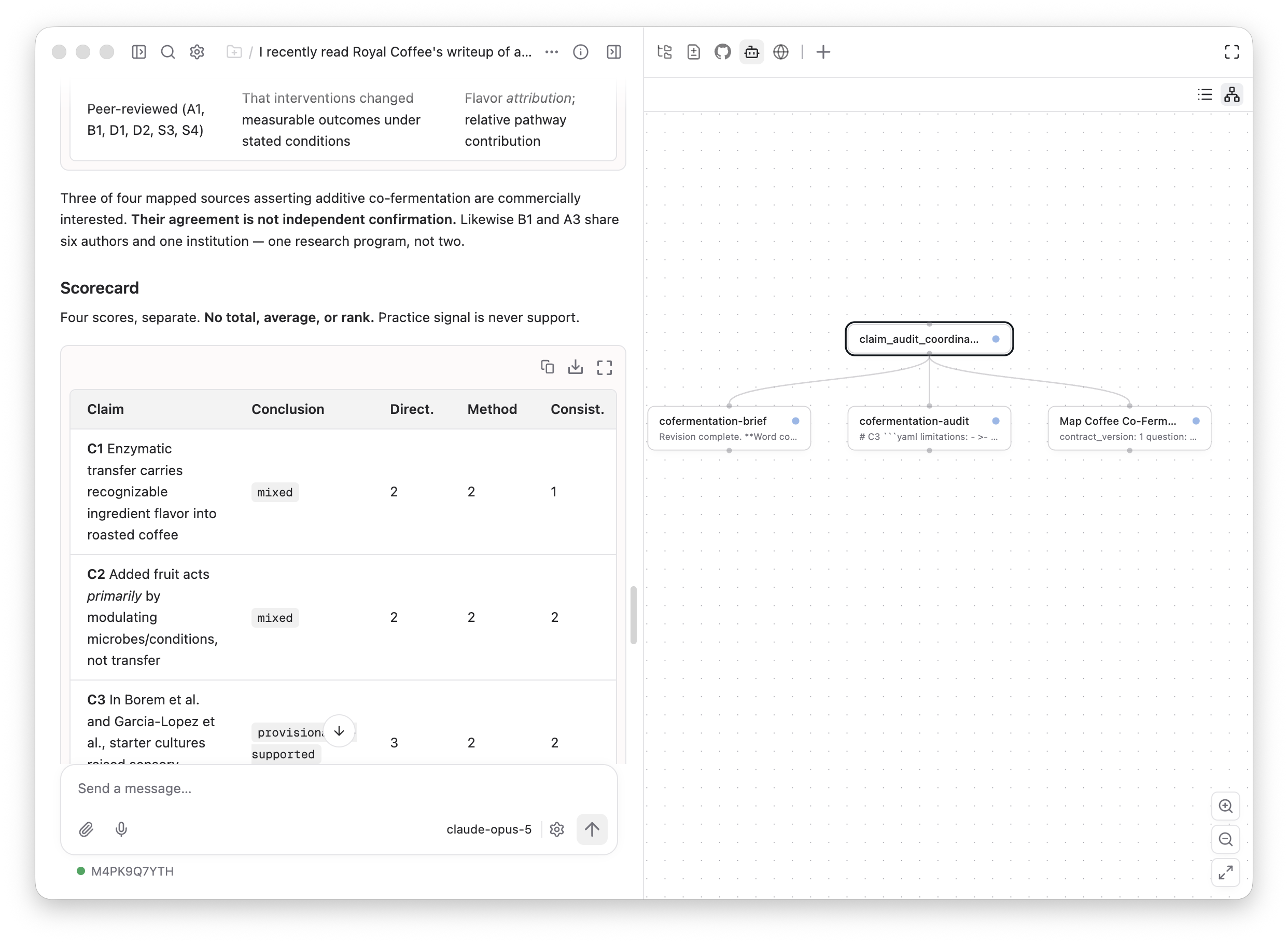
A live claim-audit run in Omnigent. The agent graph shows how the coordinator delegates work while the session keeps the resulting scorecard visible.
Map and audit the claims
The mapper examines five sources to identify claims and who made them, without judging whether they are true. It returns four claims:
- Citrus juice can give one washed Gesha a distinctive sensory profile.
- Fruit may affect flavor by changing fermentation rather than transferring flavor directly.
- Controlled microbial inoculation can improve sensory quality.
- Coffee professionals disagree over whether additive fermentation is processing or adulteration.
At this stage, a source documents where a claim appeared but it does not establish that the claim is true. The orchestrator sends each claim to the auditor in sequence. The auditor researches it independently, records evidence for and against it, identifies the evidence's limitations, and determines the narrowest conclusion it can support.
| Claim | What the auditor found | Conclusion |
|---|---|---|
| Citrus profile | The seller described one lot as dramatically altered; there was no blinded tasting or untreated control. | provisionally-supported |
| Microbial mechanism | A coffee professional proposed that fruit changes the fermentation environment, but no comparative study tested that mechanism against direct flavor transfer. | untestable |
| Sensory quality | One microbial-inoculation study reported an improvement, but it examined a different intervention and its full methods were unavailable to the audit. | provisionally-supported |
| Classification dispute | Professional and community sources documented disagreement, but not its prevalence or an official competition rule. | provisionally-supported |
During the run, the auditor process terminated while handling one claim. Omnigent surfaced the failure, and the orchestrator retried the claim in a new session and completed the workflow. We did not have to implement the failed-session or replacement-session mechanics.
Once all four claims have been audited, the orchestrator sends the results to the brief writer along with the sources and context collected during mapping. The writer cannot conduct additional research: it has no web tools, its policy permits only local file operations, and its sandbox blocks network access. It returns a one-page brief and a scorecard showing what the available evidence can and cannot establish. Overall, the evidence found and assessed was weak: definitions remain unsettled, direct studies are scarce, and the available record does not support a definitive conclusion about co-fermentation's effects.
Composing multi-agent systems with Omnigent
This claim-audit team demonstrates how Omnigent enables you to define roles, workflows, tools, and policies without having to worry about the runtime. We defined this multi-agent research system without having to implement:
- the mechanics of how subagents present their results to the orchestrator;
- how the orchestrator dispatches subagents; or
- how the guardrails we declared are evaluated and enforced.
To try it yourself, start a new Omnigent session and describe the custom agent or agent system you want. An agent can write the configuration using your chosen harnesses, models, tools, skills, MCP servers, policies, and sandboxes, then open a session with it. See the Custom Agents guide for more detail, or adapt the full claim-audit configuration.
Enjoying Omnigent? If this is useful to you, give us a star on GitHub ⭐. Come say hi on Discord, or check the latest release.